# Konfigurasi Apache

Agar dapat menghilangkan tulisan "index.php" pada aplikasi SIPP dengan menggunakan file \*.htaccess, sebuah file aplikasi Apache perlu disesuaikan, dengan cara mengetikkan perintah:

```
nano /etc/httpd/conf/httpd.conf
```

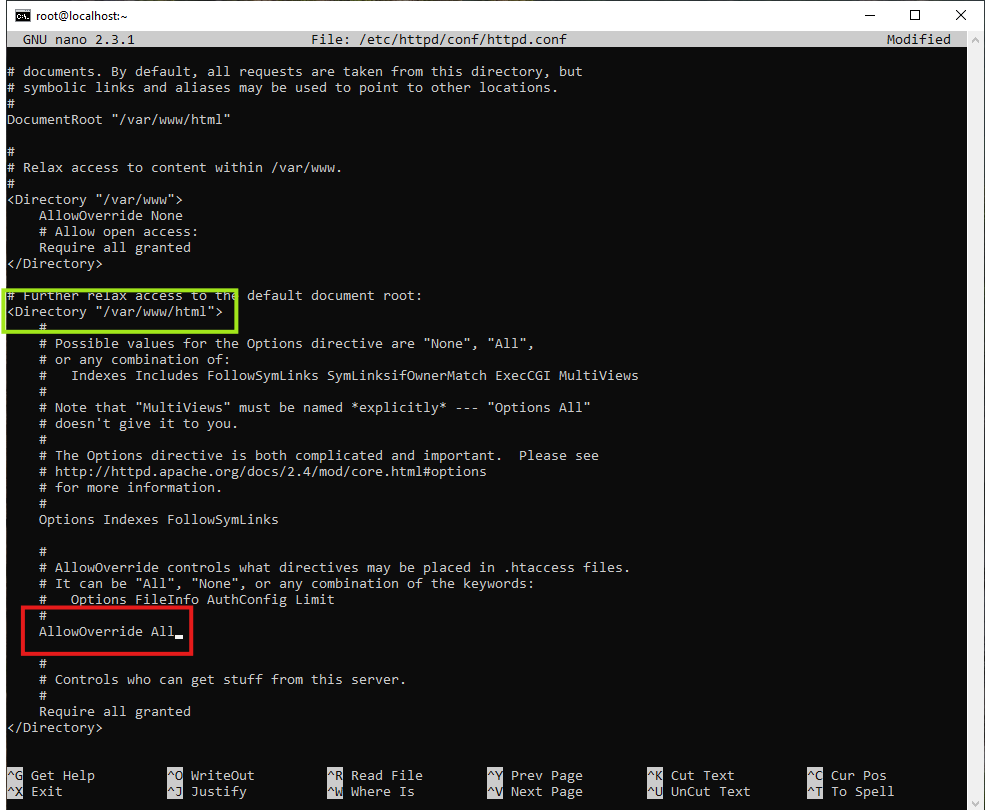
Dengan menggunakan nano, temukan string **Directory "/var/www/html"**, sehingga ditemukan baris kode yang bertuliskan:

<span lang="EN-US" style="font-size: 11pt; line-height: 107%; font-family: Consolas; color: rgb(224, 62, 45);">&lt;Directory "/var/www/html"&gt;</span>

kemudian pindah ke satu halaman kebawah, lalu temukan teks kode:

<span lang="EN-US" style="font-size: 11pt; line-height: 107%; font-family: Consolas; color: rgb(224, 62, 45);">AllowOverride None</span>

dan ubah menjadi:

<span lang="EN-US" style="font-size: 11pt; line-height: 107%; font-family: Consolas; color: rgb(224, 62, 45);">AllowOverride All</span>

<p class="callout danger">Terdapat beberapa baris kode yang tulisannya mirip. Teliti kembali di posisi mana teks kode yang akan di edit, seperti gambar di bawah:</p>

[![image.png](https://webservice.mahkamahagung.go.id/dok_ma/uploads/images/gallery/2024-10/scaled-1680-/bFge9qXYco4xoXIE-image.png)](https://webservice.mahkamahagung.go.id/dok_ma/uploads/images/gallery/2024-10/bFge9qXYco4xoXIE-image.png)

*Restart Apache* dengan perintah:

```
systemctl restart httpd
```

Pastikan *service* Apache berjalan setelah dilakukan konfigurasi, dengan perintah:

```
systemctl status httpd
```

[![image.png](https://webservice.mahkamahagung.go.id/dok_ma/uploads/images/gallery/2023-05/scaled-1680-/aH10FqLaEkDyrHbA-image.png)](https://webservice.mahkamahagung.go.id/dok_ma/uploads/images/gallery/2023-05/aH10FqLaEkDyrHbA-image.png)
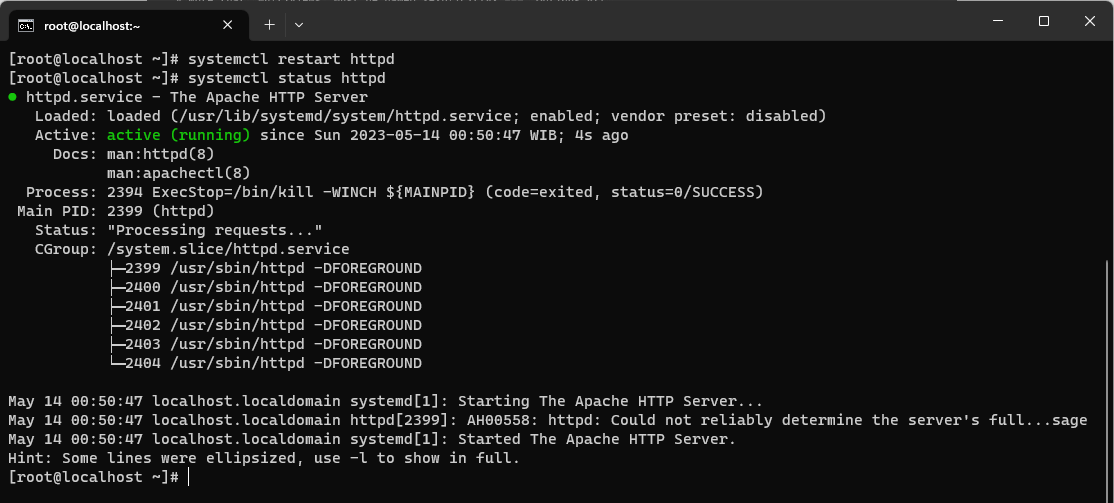
Jika pada respon dari CentOS terlihat tulisan hijau **active (running)**, menandakan bahwa konfigurasi telah berhasil.